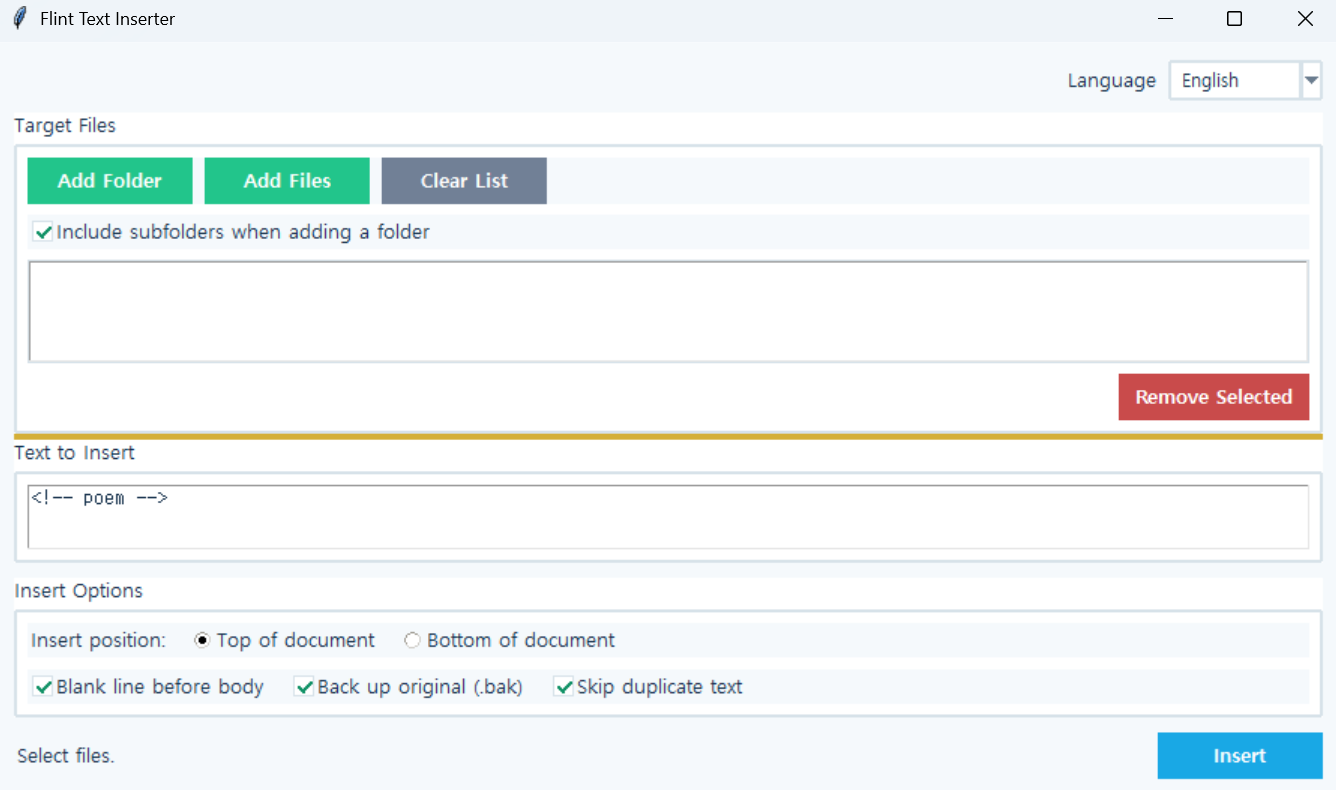
Flint Text Inserter
Version: 1.0.0
Flint Text Inserter
A tool for inserting the same text at the beginning or end of multiple text files at once.
It can be used to add classification comments such as <!-- poem --> to Markdown documents, or to apply fixed headers and footers to multiple files in bulk.
How to Use
- Click
Add Filesto select files directly, orAdd Folderto select a folder. - When a folder is selected, supported files are found in the folder and its subfolders and added to the list.
- Enter the text in
Text to Insert. - Select
Top of DocumentorBottom of Document. - Check the blank line, backup, and duplicate prevention options.
- Click
Insert.
Example:
<!-- poem -->

# A Heart Turned to Wind
Key Features
- Insert the same text into multiple files at once
- Insert text at the beginning or end of a document
- Add all supported files from a folder
- Search including subfolders
- Choose whether to add a blank line between the inserted text and document content
- Automatically skip files that already contain the same text
- Supports UTF-8, CP949, and EUC-KR encodings
- Preserves the original line ending format
- Automatically backs up original files
Supported extensions:
.txt .md .markdown .html .htm .css .js .py .json .yml .yamlRun:
python inserter.py
Note:If you are using the executable (EXE) version, you do not need to run the Python command.
